 Free Chrome extension · Ghost job detector
Stop applying to jobs that don’t exist
Posted Fresh gives every job listing a freshness score with plain-English reasons. It catches old jobs reposted to look new and tracks your applications, all privately in your browser.
- 100% free
- Unlimited checks
- No account
- Data stays on your device
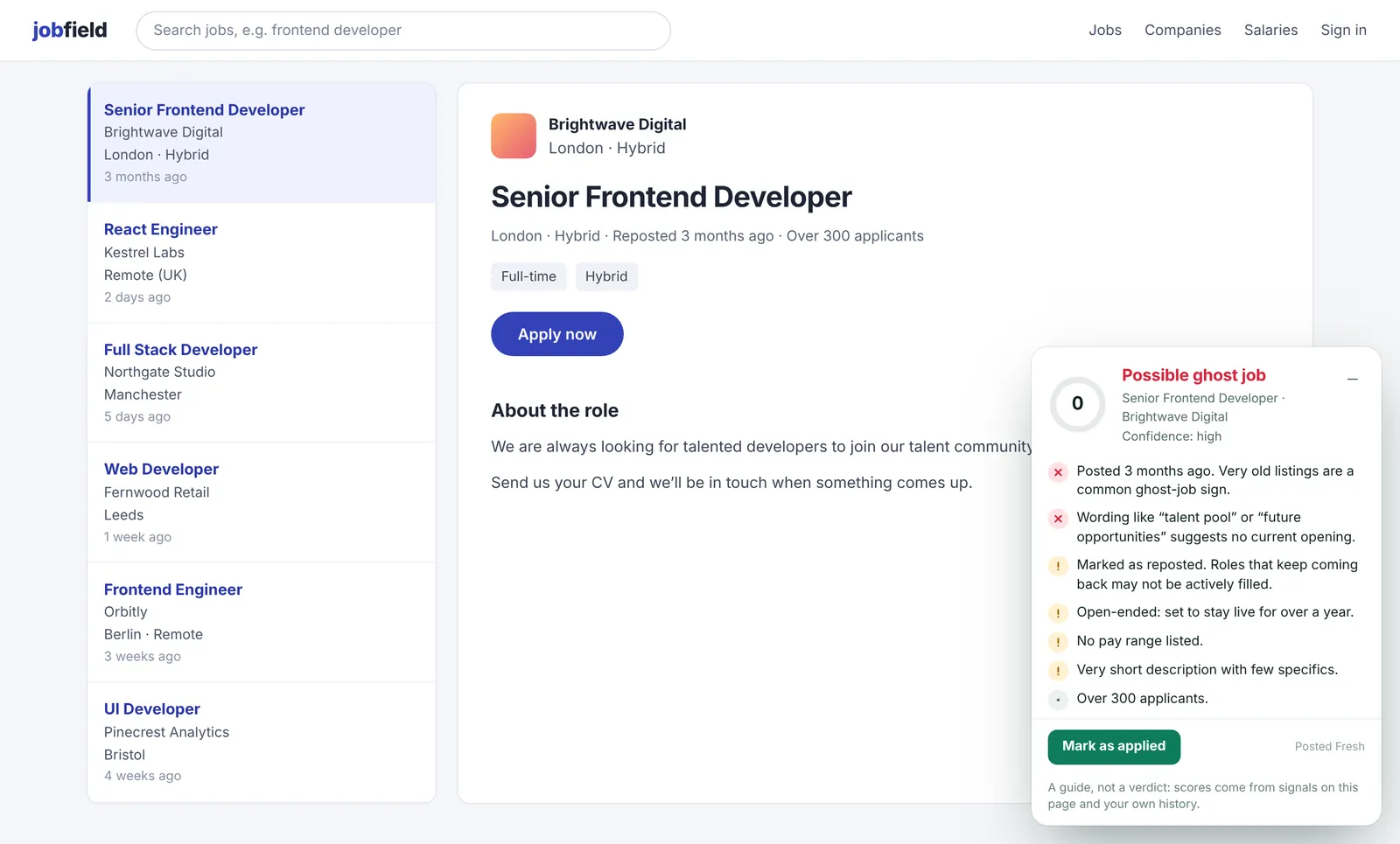
Know if a job is real before you spend an hour applying
Posted Fresh reads the signals hidden in every listing and turns them into a clear score from 0 to 100.
Posting age
How long the job has really been up, read from the listing and the site’s own job data, not just the label on the page.
Repost detection
Flags jobs marked as reposted, and remembers jobs you’ve seen so an old listing can’t pretend to be new.
Red-flag wording
Spots “talent pool”, “future opportunities” and other signs that there’s no real opening right now.
Pay and applicants
Shows whether pay is listed and how crowded the role is, along with signs of active hiring.
Closing dates
Warns when a listing’s closing date has passed, or when it’s set to stay open for over a year.
Application tracker
Mark jobs as applied, update the status, see which ones went silent, and export everything to CSV.
See Posted Fresh in action
Click any screenshot to see it full size.
Spot ghost jobs at a glance
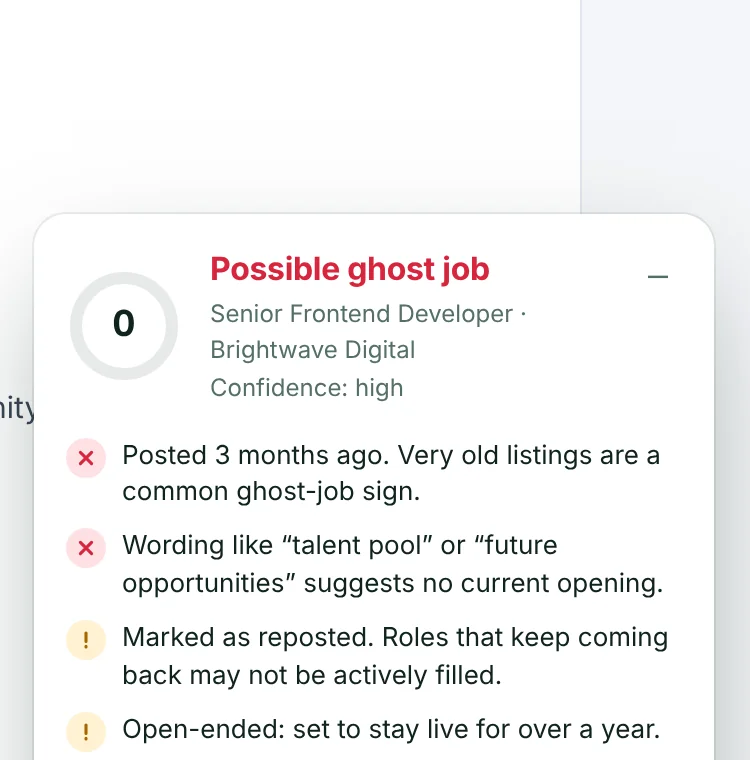
A small card appears on every job listing with a score and the exact reasons behind it, so you know what to skip.
- Three clear verdicts: Looks fresh, Check before applying, Possible ghost job
- Plain-English reasons, not a black box
- Confidence level based on how many signals were found
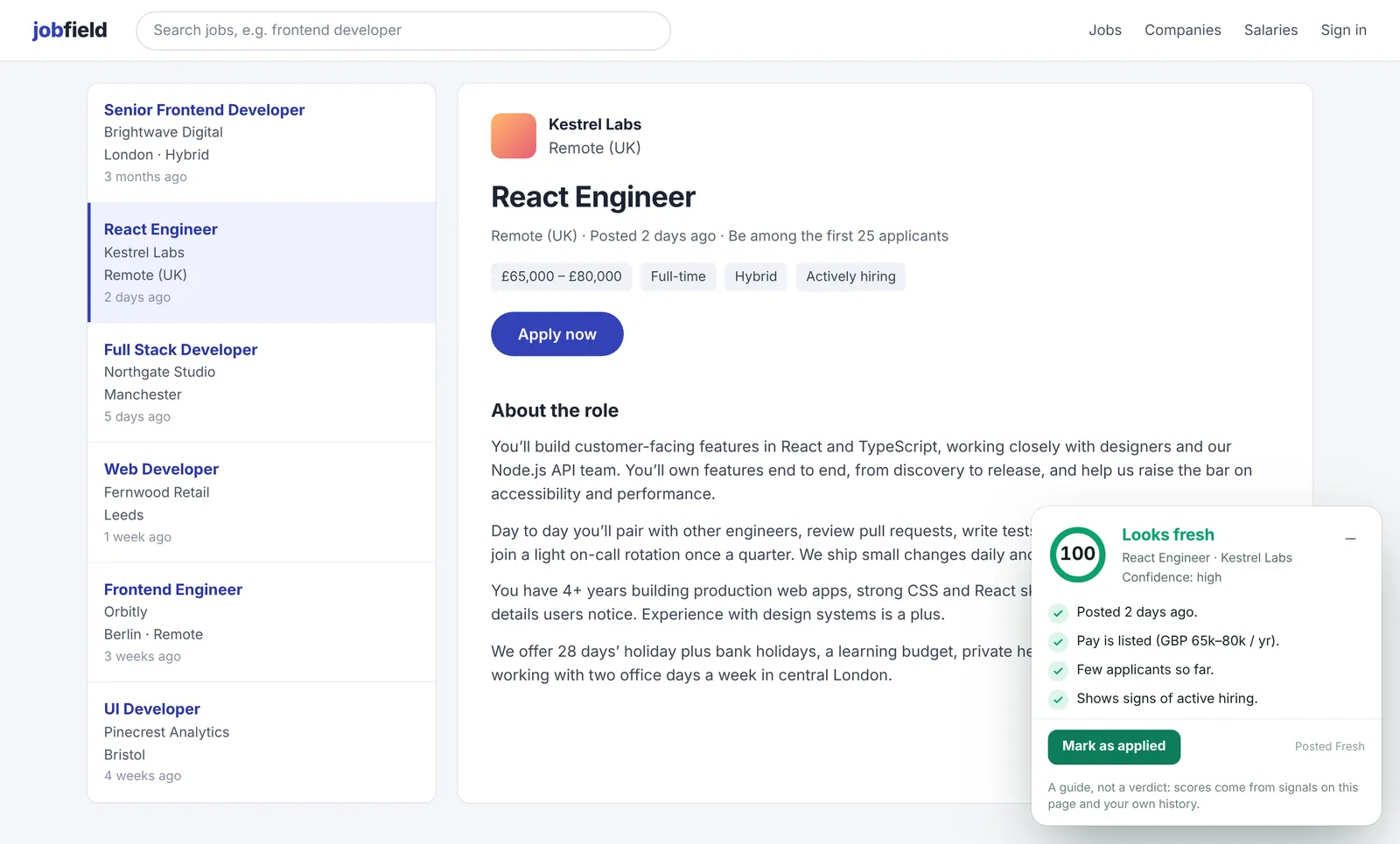
Real, active openings are clearly marked
Recent posts with listed pay and signs of active recruiting score high, so you can put your best effort where it counts.
- Posted date checked against the site’s own job data
- Pay range and applicant numbers
- Signals such as “actively hiring”
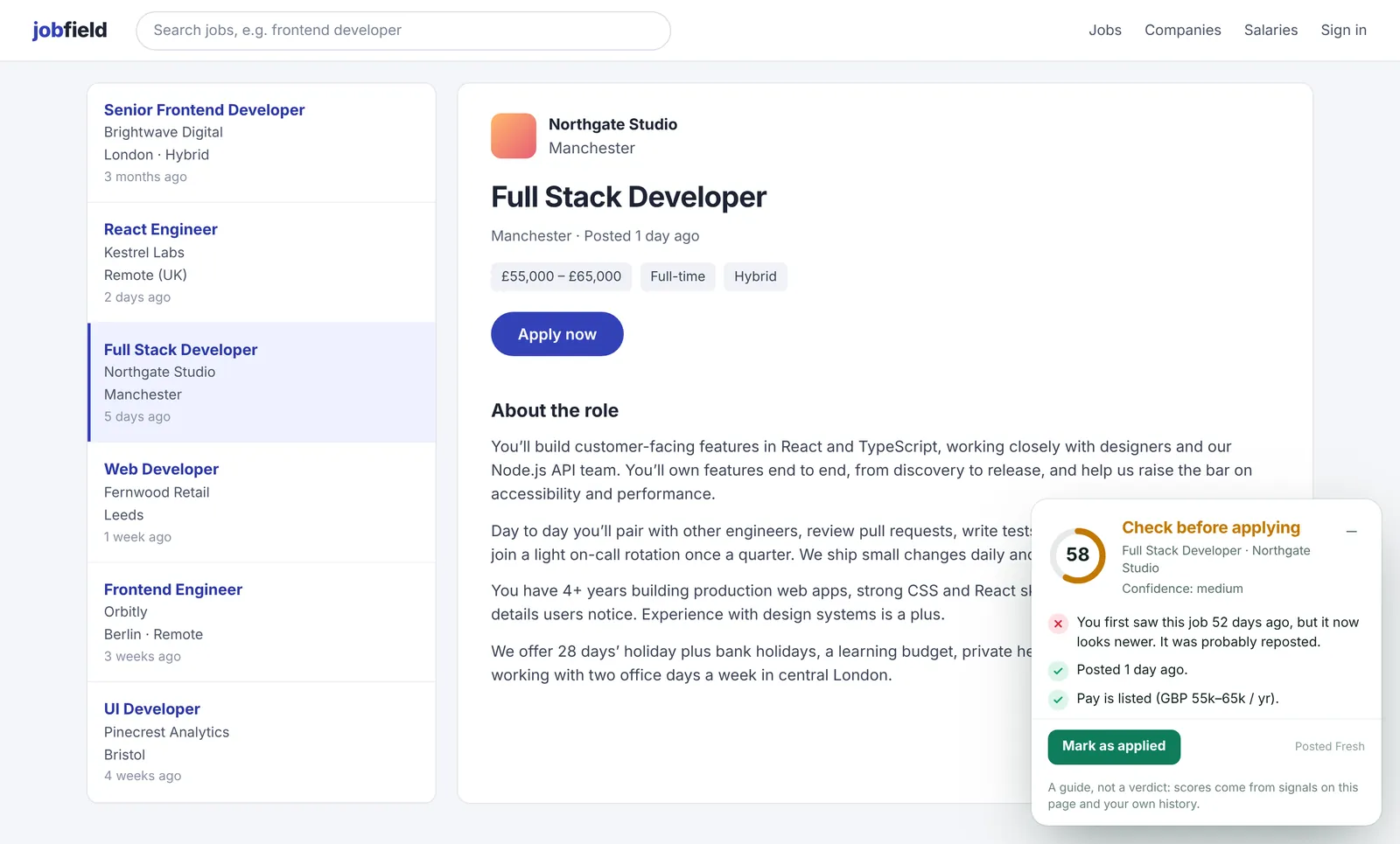
Catches reposts that look brand new
Posted Fresh quietly remembers the jobs you view. When an old listing comes back as “posted 1 day ago”, it tells you when you really first saw it.
- Works across job boards and company career pages
- Matches the same role posted under new listing IDs
- History is stored only on your computer
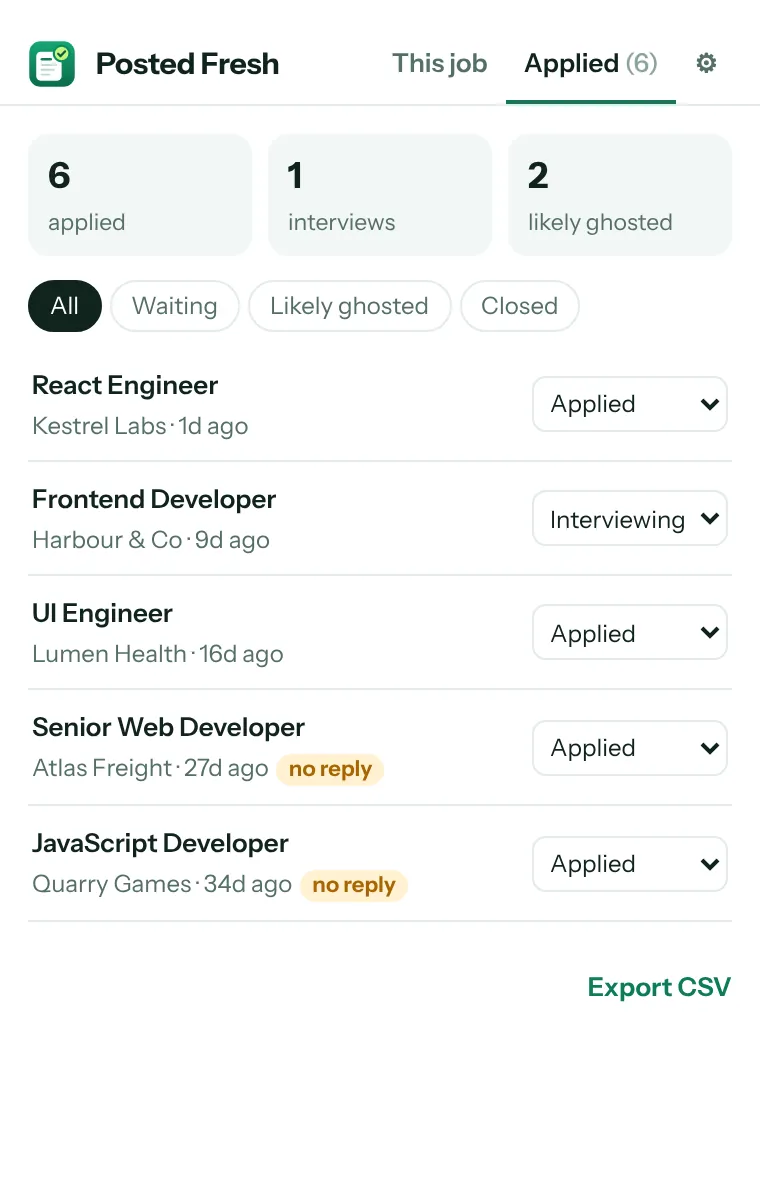
Track every application and see who ghosted you
Click “Mark as applied” on any job and it’s added to your private tracker in the toolbar popup.
- Statuses: applied, interviewing, offer, rejected
- Flags applications with no reply after 21 days (you choose the number)
- Export everything to CSV any time
Install Posted Fresh in under a minute
Works in Google Chrome and other Chromium browsers such as Microsoft Edge, Brave and Opera.
Open the Chrome Web Store
Click Add to Chrome on this page to open Posted Fresh’s Chrome Web Store listing.
Click “Add to Chrome”
On the store page, click the blue Add to Chrome button.
Confirm
Chrome shows the job sites the extension can read. Click Add extension.
Pin it to your toolbar
Click the puzzle-piece icon next to the address bar, then the pin beside Posted Fresh, so your tracker is one click away.
Use Posted Fresh while you job hunt
There’s nothing to set up. Just browse jobs the way you normally do.
Open any job listing
On supported job boards and career pages, the Posted Fresh card appears in the bottom-right corner automatically.
Read the score and reasons
Click the card to expand it. Green means fresh, amber means check first, red means it’s probably a ghost job.
Check jobs on other sites
On a site Posted Fresh doesn’t open automatically, click the toolbar icon and choose Check this page.
Mark jobs as applied
Click Mark as applied on the card. The job is saved to your private tracker.
Manage your applications
Open the toolbar popup and go to Applied to update statuses, filter jobs that went quiet and export to CSV.
Adjust settings
In the ⚙ tab, choose when to flag an application as ghosted, hide the card, or clear your history.
Questions and answers
Is it really free?
Yes. No account, no daily limits, no credits and no ads.
Which job sites does it work on?
It opens automatically on popular job boards in the US, UK and Europe, and on company career pages hosted by common applicant-tracking systems. On any other site, click “Check this page” in the toolbar popup.
Does it upload my data?
No. Posted Fresh has no servers. It reads the job page you’re viewing, scores it in your browser, and keeps your history and tracker on your device. Read the privacy policy.
Can the score be wrong?
Sometimes. The score is a guide based on signals in the listing and your own history, not a verdict. A low score means “check before you spend an hour on this application”.
Does it apply to jobs for me?
No. It never clicks, applies or collects listings in bulk. It only reads the page you’re looking at.
How do I move my tracker to another computer?
Export it to CSV from the Applied tab. Your data is stored only in this browser, so it isn’t synced automatically.
Spend your time on jobs that are really hiring
Free, unlimited and private. Add Posted Fresh to Chrome and see the score on your next job listing.
Lavkush Kumar
Freelance full-stack developer with 7+ years of experience. I build fast marketing websites and landing pages in WordPress, Webflow, Shopify and Next.js, plus custom Chrome extensions like Posted Fresh.